
Current server status: Heart Status Page
PHP security update
You may have seen reports of a security issue affecting PHP (the software behind many websites) that affected a number of companies yesterday. Our hosting team has already applied patches across our platform for these vulnerabilities.
If your website runs PHP 7.2 or later, it’s already protected — there’s nothing you need to do. If it’s running an older version, we’d recommend upgrading as soon as possible.
Setting up email Managing your mailbox Fixing common problems Domain & DNS settings SSL certificates
Setting up email
IMAP settings, video guides, and how to check your inbox anywhere.
Managing your mailbox
Create accounts, reset passwords, and sort out storage.
Fixing common problems
Can’t send email, connection issues, and spam filtering.
Domain & DNS settings
Nameservers, transfers, and connecting to Wix or Squarespace.
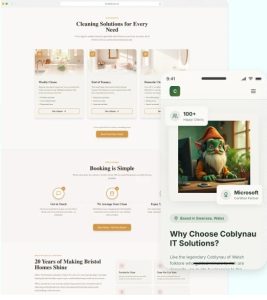
Need a website?
We’ll build you a clean, mobile-friendly website, hero, services, about and contact sections, click-to-call, calendar booking, and a contact form straight to your inbox.
Built by our team, no DIY required, and takes about 30 minutes of your time.
Setting up your email
Your device or mail client should have detailed instructions for adding a mailbox, but here’s everything you’ll need:
- Account type: IMAP
- Username: your full email address
- Password: your mailbox password
- Incoming server: imap.extendcp.co.uk — Port 993 — SSL/TLS
- Outgoing server: mta.extendcp.co.uk — Port 587 — STARTTLS
- Authentication type: Password
Why IMAP over POP3?
With IMAP, you can be logged in on your phone, tablet and computer at once — delete an email on one device and it disappears everywhere. That’s why we always recommend it.
Video guides
- Finding your domain password and logging into your control panel
- Setting up email on Mac Mail
- Adding an email account to Outlook for Mac
- Adding your email to the Windows Mail app
- Adding your email to iPhone or iPad
Accessing your email
You can get to your inbox three ways:
- Through your hosting account
- Via webmail
- Through a third-party client like Outlook, Mac Mail, or your phone’s mail app
Managing your mailbox
Creating a new email account
- Log into your Control Panel
- Click Mail Boxes under Email
- Under Email Address, enter the name you’d like (e.g. your.name@your-domain.co.uk)
- Click Add
- You’ll see it listed under Modify Mail Boxes
It can take up to 60 minutes to fully activate, after which you’ll be able to send and receive as normal. ✓
Resetting your mailbox password
- Log into your Control Panel
- Click Mail Boxes under Email
- Enter a new password under Change Password
- Click Modify
Your mailbox will be unavailable for up to 5 minutes while the change takes effect.
Running out of storage
Each mailbox comes with 1GB as standard. To check your usage or free up space:
- Log into webmail at www.outitgoes.com and check Settings — make sure Thread support is switched off
- Delete anything you don’t need — remember to empty Deleted Items/Trash too, as that still counts towards your storage
- Back up anything important first — once deleted, we can’t recover it
Need more space? We can increase your mailbox:
- First upgrade: doubles to 2GB — £20/year
- Each upgrade after that: +2GB — £12/year (up to 10GB)
Contact the office on 0117 950 2667, or email support@duport.co.uk to arrange this.
Fixing common problems
Why can’t I send emails?
Work through these in order:
- Mailbox full? Check your capacity in the control panel — if it’s near 100%, delete some emails or increase your storage (see above).
- Wrong outgoing server? It should be mta.extendcp.co.uk.
- Password issue? Retype it, or confirm it’s correct by logging into webmail.
- Authentication settings wrong? Your outgoing server should authenticate using your password — if SSL is switched on for this, try turning it off.
- Wrong port? Use port 587 (or 465 if 587 doesn’t work). Port 25 isn’t supported for sending.
Mailbox connects to webmail but not to a third-party app
Two common causes:
1. Password strength. Avoid reusing an old password, using the same password across mailboxes on your domain, or weak combinations. A strong password should be at least 12 characters, unique, and mix upper/lowercase, numbers and symbols. Check yours with this Password Meter Tool.
2. TLS 1.2 support. Your mail app needs to support TLS 1.2 — Outlook versions before 2016, for example, don’t.
Emails going to spam
If we host your email, add an SPF record via Manage Domain → DNS Management in your Control Panel. Add this as a TXT record (you can only have one SPF record at a time, and only if we host your email):
v=spf1 include:secureserver.net exists:%{i}.mta.spf.extendcp.co.uk exists:%{i}.web.spf.extendcp.co.uk -all
Dealing with spam/junk mail
Spam happens to everyone, but there are filters in your control panel under Email → Junk Mail Filters:
- One persistent sender? Add them under “reject by sender” and click Update.
- Spam from lots of addresses? Adjust the Junk Mail Filter Level (Low/Medium/High/Extremely High). Go up one level at a time and check nothing genuine is getting caught.
PHP security update: what you need to know
A security issue affecting PHP (CVE-2026-109618 and CVE-2026-109619) affected a number of companies yesterday. Our hosting team has already patched PHP versions 7.2 and above across our platform against these specific vulnerabilities.
If your website is running PHP 7.2 or later, it’s already protected ✓ and no further action is needed.
If any of your websites are running a version below PHP 7.2, we’d recommend upgrading as soon as possible, provided your website is compatible — older PHP versions are no longer supported.
How to safely update your PHP version
Before you change anything: jumping up several PHP versions at once is a bigger change than it sounds, and you’ll need to make sure your WordPress site is compatible first. If WordPress, your theme, or any plugins aren’t compatible with the new version, parts of your site may stop working or show errors.
Step 1: Check your site is ready
1. Take a full backup of your website and database, so you can restore it if anything goes wrong.
2. Update WordPress, your theme, and all plugins to their latest versions — in your WordPress dashboard, go to Dashboard → Updates.
3. Check each plugin and your theme is compatible with the PHP version you’re moving to. Search for each plugin on wordpress.org — the plugin page shows the minimum PHP version it needs and when it was last updated. Plugins that haven’t been updated in a couple of years are the most likely to cause problems, so it’s worth replacing or removing those. For premium themes or plugins, check the developer’s website instead.
4. Check Site Health — in WordPress, go to Tools → Site Health, which will flag up any issues it finds.
Step 2: Change the PHP version
1. Log into your hosting account.
2. Click on Switch PHP Version.
3. Select the version you’d like from the drop-down list.
4. Click Update.
Once it’s changed, go through your website thoroughly — including the main pages, any forms, and the WordPress admin area — to make sure everything’s working as it should.
If something stops working
Don’t worry — you can switch back to your previous PHP version in the same place while you look into it. If the site has an issue, the usual way to find the cause is to deactivate all plugins, then reactivate them one at a time, checking the site after each one, until the problem plugin shows itself.
If you’re not sure about any of this, or would like us to check it for you, just get in touch.
Update, 22 October:
There’s been no evidence of this vulnerability being successfully exploited across our platform, and very little evidence of it happening anywhere else. Our default PHP configuration makes it difficult to abuse, but we’ll stay alert and take further action if anything changes.
Domain & DNS settings
Changing your DNS records
If you have domain and hosting with us, log into your hosting account and click Manage Domain.
If you have a domain-only service, email support@duport.co.uk to request your control panel password.
Changing your nameservers
Email support@duport.co.uk
Transferring your domain elsewhere
- .uk domains: Get an IPS tag from your new provider and email it to support@duport.co.uk, we’ll handle the transfer.
- .com / .net / .org domains: Email support@duport.co.uk, we’ll unlock your domain and send you the authorisation code to give to your new registrar.
Connecting your domain to Wix or Squarespace
Keeping your email with us, moving your website elsewhere?
Send us the new website’s DNS records (usually an A record and/or CNAME record, you’ll get these from your new website provider):
- A record example: 12.34.567.4
- CNAME record example: [www.thisisdns45.net](https://www.thisisdns45.net)
Moving both hosting and email elsewhere?
Send us your new provider’s nameservers instead (usually 2–4, e.g. ns1.nameserver.com, ns2.nameserver.com).
SSL certificates
What is an SSL certificate? It keeps data secure between your website and its visitors’ browsers. Without one, browsers will flag your site as “Not Secure.”